
←
All Articles
Productivity • AI

5 AI tools I’m actually using in my workflow
There are thousands of AI tools available. These are some of the ones that have actually found a place in my day-to-day workflow.

Clemence Kotoku
4 min read

There are thousands of AI tools now, and a new list of “must-have” ones appears every week. I’ve tried a lot of them. Most didn’t last more than a few days.
The ones that stayed have something in common. They didn’t add a new step to my work. They removed one, or made an existing step noticeably better. That is the bar I use now: if a tool doesn’t earn a place in how I actually work, it goes.
Here are five that have earned it.
1. Claude Code, for building
This is the one that has changed my work the most. Claude Code works inside a real codebase, reads the files, runs commands and makes changes, while I stay in charge of the decisions.
I use it across my own products and client builds. Motion Studio, my motion graphics experiment, was built with Claude Code as the operator: it reads the script, plans the scenes and writes the animation code, and I direct and review. On bigger projects it handles the repetitive parts of development so I can spend more of my time on product thinking and design.
What makes it useful is not that it writes code. It’s that it can hold a lot of context about a project and keep working through a multi-step task without me steering every line. It is still my job to know what good looks like and to check the work.
2. Claude, for thinking and writing
Before I build or write anything, I usually talk it through. Claude has become that sounding board. I use it to pressure-test an idea, outline a page, rework a paragraph that isn’t landing or turn rough notes from a client call into a clear brief.
I don’t hand it my voice. I use it to get unstuck faster, to see a problem from another angle and to do the first rough pass so I can spend my energy on the part that needs judgement.
3. Gemini, inside the products
Some of the most useful AI in my work is AI that my users never think of as “AI tools”. Inside Incep Platform, AI helps plan a website structure from a short description of a business, draft content and edit pages from plain-language instructions. Gemini is one of the models behind parts of that.
Working with models at that level has taught me more than any demo. You learn quickly where they are reliable, where they need guardrails and where a simple rule works better than a clever prompt.
4. ElevenLabs, for voice
Video is a big part of how I share what I’m learning, and a clean voice-over used to be the slowest part of producing anything animated. ElevenLabs generates natural voice-over from a script, and in Motion Studio it does more than that: the word-level timing it returns is what lets every animation land exactly on the word it belongs to.
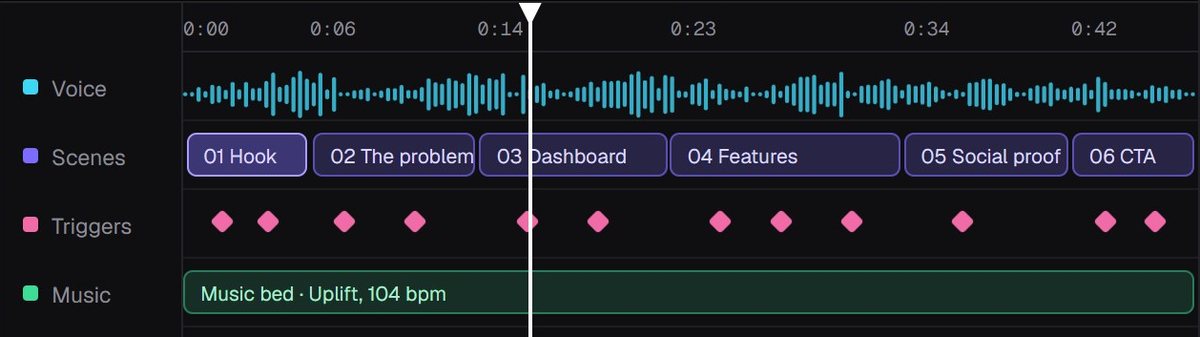
It is optional in that workflow. I can always record my own voice. But for drafts, explainers and fast iterations, it saves hours.
5. AI image generation, for visuals
When a project needs an illustrative photo that doesn’t exist, like a scene for a service page or an article header, I use AI image generation instead of settling for a generic stock image. It is faster than a photoshoot for a concept, and far more specific than a stock library.
I keep one rule here. Real work stays real. Client projects, my own photos and anything that represents something that actually happened are never generated or altered. AI is for illustrating ideas, not faking evidence.
How I decide what stays
After a lot of trial and error, I ask three questions about any new tool:
- Does it remove a real step, or add a new one? A tool that needs constant babysitting is not saving time.
- Is the output good enough to use, or only good enough to demo? Plenty of tools look impressive for five minutes.
- Would I notice if it disappeared tomorrow? If the honest answer is no, it doesn’t belong in the workflow.
The goal is not to use more AI. The goal is to do better work, and use AI where it genuinely helps.
My list will change. Some of these tools will be replaced by better ones, and I’ll keep experimenting. But the principle won’t change: tools earn their place by making the work better.
If you’re trying to figure out where AI could actually help in your business, not just what is trending, I’m happy to talk it through. Get in touch.
Written by
Clemence Kotoku
Web designer, developer and digital marketer. I build websites, digital products and systems that help businesses grow, and I write about what I learn along the way.
Working on something?
Let’s make your website do more.
Tell me what you’re building or improving, and I’ll come back with the right way forward.
Share this article
Keep Reading
More from my desk.

Websites • Marketing
Your website is useless. Let me explain why.
A website doesn’t make sales simply because it exists. Here’s what actually needs to happen before your website can contribute to growth.
Web Design • Conversion
What makes a high-converting website?
Good design isn’t just about making a website look impressive. It’s about helping the right person understand what you offer and what they should do next.
Building • Product
What building products has taught me about websites
Working on my own products has changed the way I think about designing and developing websites for other people.
Let’s Connect
Have something you’re trying to build?
Whether it’s a website, a campaign or a product idea, I’d love to hear about it. Start with the problem. We’ll figure out the rest together.